

Sending a test to yourself:
To preview your newsletter more accurately, you can send a test to yourself. This will send a real newsletter to the email address associated with your Joomla User data. To do this, you need to be in the Preview window. If you're not, go to the "Newsletters" section and click on the name of the newsletter you want to send to yourself, and then click the "Preview/Send" button in the upper right.
In the upper left of the preview window, you will see "Send a test" section with your email address in the window (see image below). All you need to do is click the "Send a test" button. AcyMailing will instantly send this newsletter to your email address. Check your email. Your newsletter should be in your inbox.
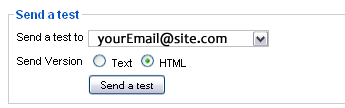
This email address comes from your Joomla user data. If you want to change this address, you will need to go to the "User Manager" under "site" at the very top. You will see all the registered users and administrators for your site. Click your name and change your email in the edit window. Be sure to save your work.