Adding Articles to your Newsletter
We suggest you organize your newsletter into descriptive headings so people can find information quickly. The intent of a newsletter is to remind everyone you're still offering your goods and services, and you are sharing information that is hopefully interesting and relevant to your audience. Hopefully, after reading the newsletter, they will click a link that will take them back to your site.
In thinking about your audience and newsletter marketing goals, you have several decisions to make. You can include the entire article, or just the first couple of paragraphs with a link back to your site. These first paragraphs are called "intro text." For more information on creating articles in the first place, click here for article management.
Inserting your first article
We have to insert a tag that will tell the system to insert your article. A tag is just a piece of code that is inserted into your newsletter that will be replaced by some type of content when it sends. Rather than copying and pasting text, you can insert article tags, save your newsletter, and go back to make changes in any of your articles; the text changes will automatically be updated when you send.
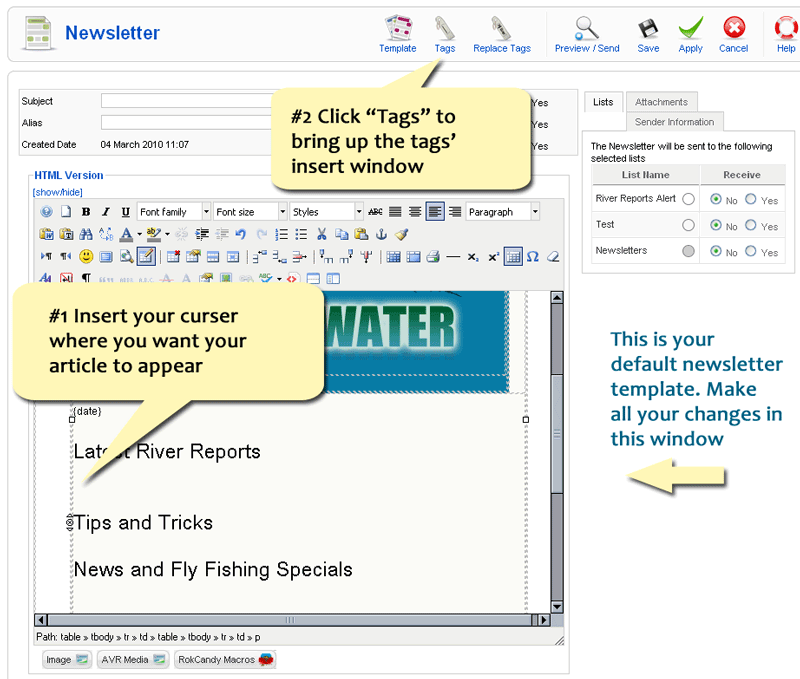
First, click your cursor in the edit window where you want your article to show up. Then click "Tags" up at the top. (See diagram below)