Article Insertion Choices
This next window allows you to make some choices in how your article will eventually appear. The first thing you will want to do is find your article. On the right, you will see a pull-down menu that defaults to "all." This shows ALL articles on your site. You can quickly filter out the section/category by opening this menu and picking the appropriate category. Or if you know your title, you can type the entire title or partial title into the "Filter" box on the left and press "Go." this will search your articles for whatever you just typed.
Once you have found your article, just click the title. Automatic code will be generated, and your selection will turn pale orange. (see diagram below)
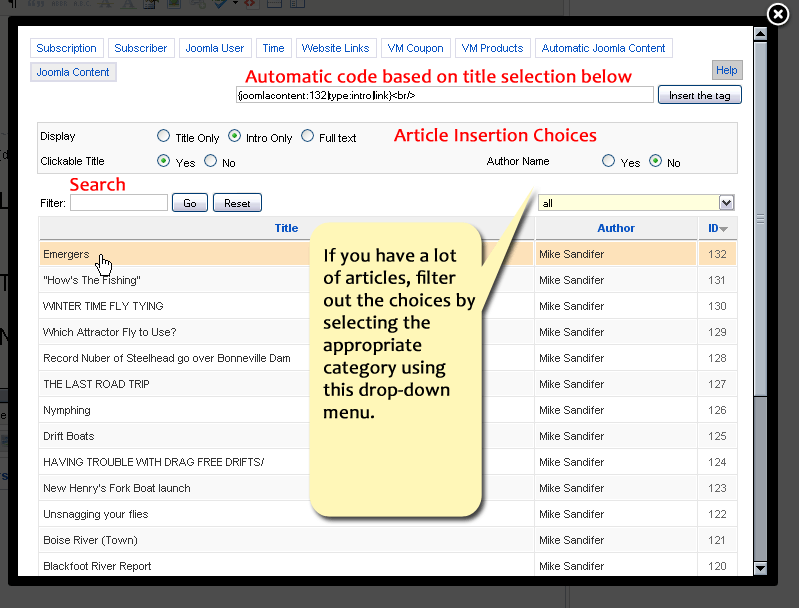
All you need to do is decide if you want to show the Intro text or the full text. Intro text is all the text in an article before you press the "read more" button in the Joomla article manager edit window. You can also chose whether or not to show the author name or make the title clickable. If you chose this option, the article title will automatically take the reader back to your site to read that article on your website.
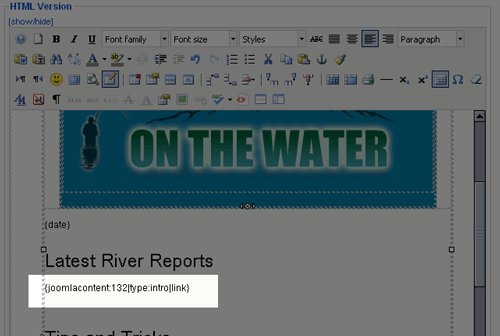
Once you've made all your selections, just click "Insert the tag."In this case, a small piece of code is automatically inserted into your newsletter edit window. (see diagram below)