• WelcomeLet's Get Started!
  • Architectural ServicesComprehensive & Affordable
    • Getting StartedTaking the first steps
    • Architectural Rendering - How it worksSuperior Visualizations
    • The Cinematic EdgeEnhance your renders!
    • Residential RenderingsStarting at $495
    • Commercial RenderingsStarting at $950
  • 3D ServicesIllustration & Animation
    • 3D Benefits
    • Animation2D or 3D
    • MultiMedia Production
    • IllustrationEndless Possibilities
    • 3D Product Visualization
  • Graphic/Web DesignInnovate Your Marketing
    • Print Design
    • Logo Development
    • Custom Illustration
    • Web DevelopmentPowerful CMS sites
      • Start-up Packages
      • Multimedia Support

AcyMailing: Getting Started

  • Print
  • Email
Details
Hits: 19119

Article Index

  • AcyMailing: Getting Started
  • Create a new newsletter
  • Adding Articles to your Newsletter
  • Tags Selector
  • Article Insertion Choices
  • Previewing your Newsletter
  • Sending a test to yourself
  • Importing your Joomla Users
  • Sending your Finished Newsletter
  • All Pages
Page 4 of 9

The Tags Selector

The next window to appear will be your Tags Selector. Each tab across the top will bring up options (tags) you can inset into your newsletter. The tab, "Subscription" will bring up tags that you can insert such as: user name, name, email. For this section, we just want to add an article, click on "Joomla Content." (see diagram below)
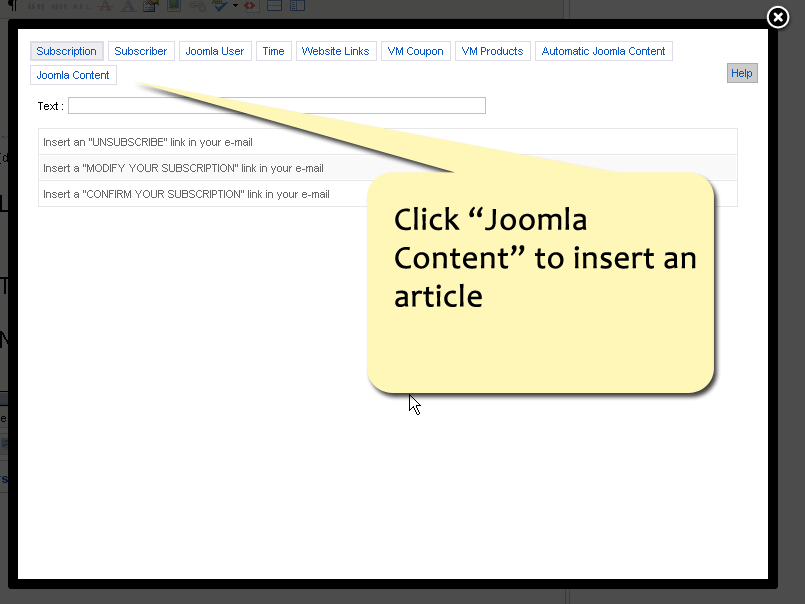
joomla_content


  • Prev
  • Next
Back to Top